Resources
Get VoicePatrol running in minutes!
Unity Engine
- Download: Download the VoicePatrol Unity package from the Get Started page.
- Import the Unity Package: Right-click in your Unity assets folder, select Import Package > Custom Package... open the VoicePatrol Unity package file.
- Add to Unity Scene: Drag the VoicePatrol unity prefab into your start scene.
- Enter API Key: Copy your project API key from the Settings page and paste to the VoicePatrol unity prefab.
- Voice Engine Integration: Open the VoicePatrolUnityExample script and uncomment out applicable voice engine code.
Now VoicePatrol is active in your Unity project! See full details here.
Unreal Engine
- Download: the VoicePatrol Unreal plugin from the Get Started page.
- Extract: the downloaded file to your plugins folder (if you don't have a plugins folder you can create one in your project root folder).
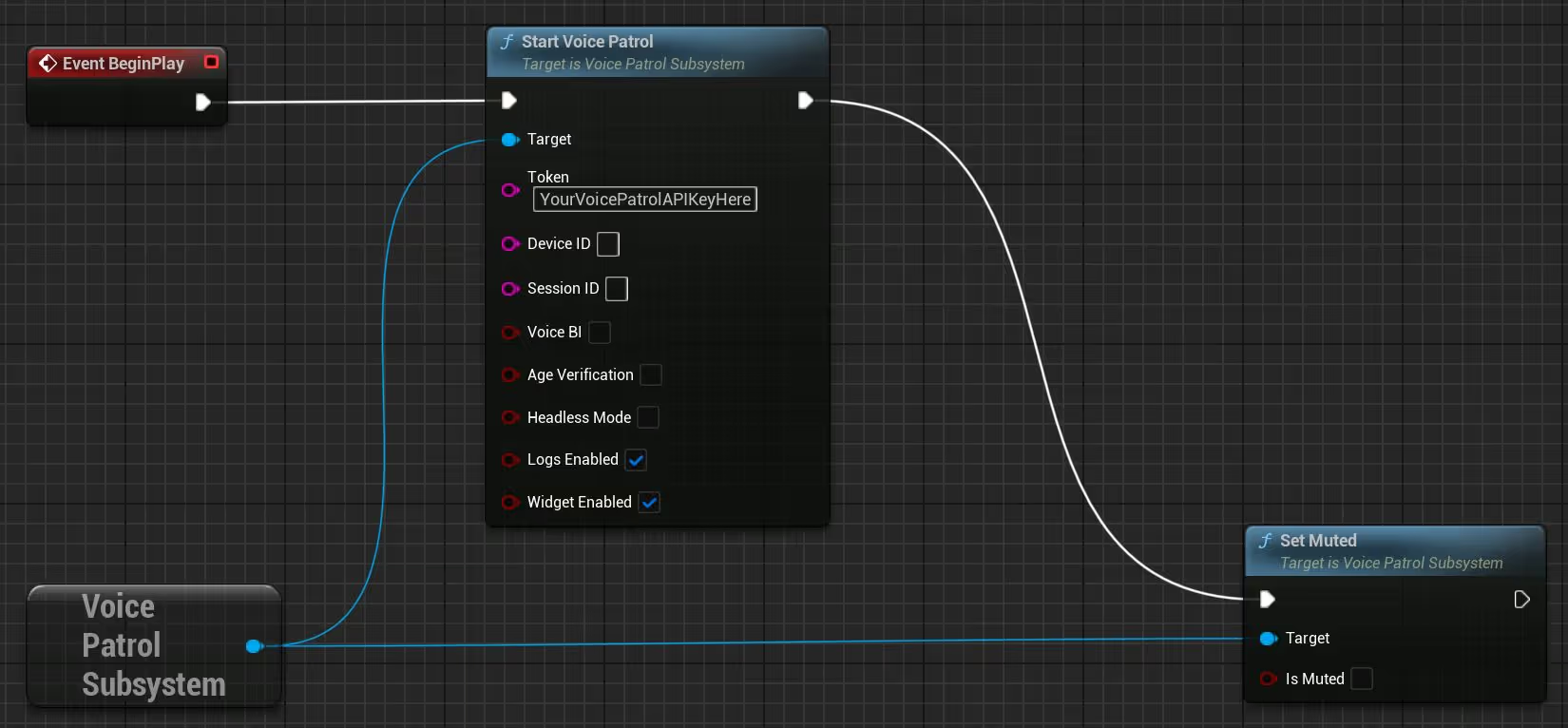
- Open: your starting Level Blueprint (or any Blueprint where you want to initialize the SDK).
- Off the
Event BeginPlayexecution pin, search for and place a Start Voice Patrol node. The Target pin will auto-resolve to the VoicePatrol subsystem.
- Off the
- Fill in the parameters:
- Token: your API token from the VoicePatrol dashboard
- Device ID: leave empty to use a generated/persisted device ID
- Session ID: leave empty (reserved for upcoming server-to-server integrations)
- Voice BI: false (or true to enable Voice Business Intelligence)
- Age Verification: false (or true to enable age estimation)
- Headless Mode: false (reserved for upcoming server-to-server integrations)
- Logs Enabled: true (recommended during integration)
- Widget Enabled: true (shows the in-game debug overlay)
- Off the
Start Voice Patrolexecution pin, place a Set Muted node and setIs Mutedto false. The SDK begins in a muted state by default; this enables audio processing.
- Off the
- Compile and save Blueprint.
- Press Play: You should see the SDK start, a microphone get selected, and PINGs flowing in the Output Log. Speak something into your mic to confirm violations come back.
Introduction
VoicePatrol is a comprehensive voice moderation SDK that provides real-time analysis of voice communications in multiplayer games. It offers automated content moderation, player reporting, and voice analytics to create safer gaming environments.
Real-time Voice Moderation
Automatically detect harmful speech patterns, harassment, and inappropriate content.
Player Reporting
Capture audio evidence for manual moderation review.
Voice Business Intelligence
Analytics and insights from voice communications.
Multi-platform Support
Android, Windows, macOS, and Linux
Voice Engine Agnostics
Works with Vivox, Photon Voice, Dissonance, and custom solutions.
Installation & Setup
Prerequisites
- - Unity 2020.3 LTS or newer
- - Target platforms: Android API 23+, Windows 10+, macOS 10.15+
- - Microphone permissions on target platforms
- - Internet access
Installation Steps
- Download the Package
- Download the VoicePatrol Unity package from your dashboard at dashboard.voicepatrol.dev - Import the Package
- Right-click in Unity Assets folder → Import
- Package → Custom Package...
- Select the VoicePatrol Unity package - Add to Scene
- Drag theVoicePatrolprefab into your main/startup scene
- The prefab includes all necessary components and will persist across scenes - Configure Settings
- Select the VoicePatrol prefab in your scene
- In the Inspector, enter your API key from the VoicePatrol dashboard
- Configure optional features (Voice BI, Age Verification, Debug Logs)
Core Concepts
SDK Lifecycle
The VoicePatrol SDK follows a specific lifecycle pattern.
- Initialization: SDK starts and establishes server connections
- Muted State: SDK begins in muted state (no processing)
- Active State: SDK processes audio when unmuted
- Room Management: Optional room joining/leaving for context
- Shutdown: Proper cleanup when application closes
Audio Processing Pipeline
Microphone Input → Stream to Server → Audio Analysis → Violation Detection → Callback Events
Key Components
VoicePatrolWrapper: Main interface for all SDK operations
- - Static methods for easy access from anywhere in your code
- - Thread-safe event system for violation callbacks
- - Automatic permission handling on Android
AudioCaptureProxy: Captures game audio for analysis
- - Automatically attached to AudioListener components
- - Captures mixed audio output for comprehensive monitoring
- - Required for player reporting features
Permission Manager: Handles microphone permissions
- - Automatic permission requests on Android
- - Graceful degradation when permissions denied
- - Platform-specific implementation
Install Guide
Video Guide (2 minutes)
The VoicePatrol SDK follows a specific lifecycle pattern.
Basic Integration (5 minutes)
1. Add the VoicePatrol prefab to your scene
2. Initialize in your game manager:
using VoicePatrol.Scripts;

public class GameManager : MonoBehaviour
{
    [SerializeField] private string apiKey = "your-api-key-here";

    void Start()
    {
        // Start VoicePatrol with basic settings
        string result = VoicePatrolWrapper.StartVoicePatrol(token: apiKey);
        Debug.Log($"VoicePatrol: {result}");
    }
}
3. Handle muting based on your voice chat state:
void Start()
{
    // Check voice chat state every second instead of every frame
    InvokeRepeating(nameof(UpdateVoicePatrolMutedState), 1f, 1f);
}

private void UpdateVoicePatrolMutedState()
{
    // Example: Mute VoicePatrol when not in voice chat
    bool shouldMute = !IsInVoiceChat() || IsVoiceChatMuted();
    VoicePatrolWrapper.SetMuted(shouldMute);
}
4. Listen for violations:
Note - Violation callbacks can contain multiple categories but only a single priority, based on the most severe. Possible priorities include: severe, high, medium.
void OnEnable()
{
    VoicePatrolWrapper.OnViolationDetected += HandleViolation;
}

void OnDisable()
{
    VoicePatrolWrapper.OnViolationDetected -= HandleViolation;
}

private void HandleViolation(VoicePatrolWrapper.ViolationEventData violation)
{
    Debug.Log($"Violation detected for {violation.UniqueId}: {violation.Priority}");

    // Take action based on violation
    switch (violation.Priority.ToLower())
    {
        case "severe":
            // Immediate action required
            MutePlayer(violation.UniqueId);
            break;
        case "high":
            // Warning or temporary action
            WarnPlayer(violation.UniqueId);
            break;
        case "medium":
            // Log for review
            LogViolation(violation);
            break;
    }
}
Room Management
// When joining a multiplayer room
void OnJoinedRoom(string roomId)
{
    VoicePatrolWrapper.OnJoinedRoom(roomId);
}

// When leaving a room
void OnLeftRoom()
{
    VoicePatrolWrapper.OnLeftRoom();
}
API Reference
VoicePatrolWrapper Static Methods
public static string StartVoicePatrol(
    string token,
    string uniqueID = null,
    bool voiceBI = false,
    bool ageVerification = false,
    bool debugLogs = false
)
Parameters:
- token: Your VoicePatrol API key from the dashboard
- uniqueID: Optional custom user identifier (null = device ID)
Caution - the use of spaces is not permitted in uniqueID.
- voiceBI: Optional flag to enable Business Intelligence tool
- ageVerification: Optional flag to enable age verification feature
- debugLogs: Optional flag to enable detailed debug logging
Returns: Status message indicating initialization result
Checks if the VoicePatrol SDK is currently running
public static string IsSdkRunning()
Returns: True if SDK is running, false otherwise
Note - Usage of this function is allowed but not strictly required, as it pertains to a feature that is coming soon.
Notifies the SDK when joining a multiplayer room
public static string OnJoinedRoom(string roomId)
Parameters:
- roomId: The unique identifier for the room
Returns: Status message indicating room join result
Note - Usage of this function is allowed but not strictly required, as it pertains to a feature that is coming soon.
Notifies the SDK when leaving a multiplayer room
public static string OnLeftRoom()
Returns: Status message indicating room leave result
Stops the VoicePatrol SDK and releases resources
public static string StopVoicePatrol()
Returns: Status message indicating shutdown result
Do not call this unless explicitly required - instead, use SetMuted to control the state of VoicePatrol.
Toggles voice analysis and usage time incrementation
public static string SetMuted(bool value)
Parameters:
- value: True to mute, false to unmute
Returns: Status message indicating mute state change result
Setting the muted state is not computationally expensive - it simply sets an internal boolean flag that causes early returns in audio processing functions. You can call SetMuted() frequently without performance concerns.
Checks if VoicePatrol is currently muted
public static bool IsMuted()
Returns: True if muted, false otherwise
Process a pre-recorded audio clip for testing or analysis
public static string ProcessAudioFile(AudioClip audioClip)
Parameters:
- audioClip: The audio clip to process
Returns: Status message indicating processing result
Audio clip must be uncompressed or load type set to Decompress On Load.
Submit the last 120 seconds of audio as evidence for manual review
public static string SubmitPlayerReport(string reportedUniqueID)
Parameters:
- reportedUniqueID: The unique identifier of the player being reported
Returns: Status message indicating whether the report submission started successfully
Note - Usage of this function is allowed but not strictly required, as it pertains to a feature that is coming soon.
Attach custom JSON-serializable metadata (max 200 bytes) to audio submissions
public static string SetMetadata(T metadata)
Parameters:
- metadata: The JSON-serializable data
Returns: Status message indicating setting result
Example:
var metadata = new {
    playerLevel = 42,
    gameMode = "Competitive",
    mapName = "Dust2",
    teamSize = 5
};
VoicePatrolWrapper.SetMetadata(metadata);
Voice Engine Integration
VoicePatrol works alongside your existing voice chat solution. The recommended approach is to check your voice engine's muted state once per second rather than every frame. Here are integration examples:
void Start()
{
// Check Vivox state every second
InvokeRepeating(nameof(UpdateVoicePatrolMutedState), 1f, 1f);
}
private void UpdateVoicePatrolMutedState()
{
bool isMuted = Unity.Services.Vivox.VivoxService.Instance == null ||
Unity.Services.Vivox.VivoxService.Instance.ActiveChannels.Count == 0 ||
Unity.Services.Vivox.VivoxService.Instance.IsInputDeviceMuted;
VoicePatrolWrapper.SetMuted(isMuted);
}
void Start()
{
InvokeRepeating(nameof(UpdateVoicePatrolMutedState), 1f, 1f);
}
private void UpdateVoicePatrolMutedState()
{
bool isMuted = PhotonVoiceNetwork.Instance == null ||
PhotonVoiceNetwork.Instance.ClientState != ClientState.Joined ||
!PhotonVoiceNetwork.Instance.PrimaryRecorder.IsRecording;
VoicePatrolWrapper.SetMuted(isMuted);
}
private DissonanceComms _dissonanceComms;
void Start()
{
_dissonanceComms = FindObjectOfType();
InvokeRepeating(nameof(UpdateVoicePatrolMutedState), 1f, 1f);
}
private void UpdateVoicePatrolMutedState()
{
bool isMuted = _dissonanceComms == null || _dissonanceComms.IsMuted;
VoicePatrolWrapper.SetMuted(isMuted);
}
void Start()
{
InvokeRepeating(nameof(UpdateVoicePatrolMutedState), 1f, 1f);
}
private void UpdateVoicePatrolMutedState()
{
bool isMuted = !MyVoiceEngine.IsConnected() ||
!MyVoiceEngine.IsMicrophoneActive() ||
MyVoiceEngine.IsLocalPlayerMuted();
VoicePatrolWrapper.SetMuted(isMuted);
}
Advanced Features
Player Reporting System
Implement an evidence based reporting system:
public class PlayerReportingSystem : MonoBehaviour
{
public void ReportPlayer(string playerId, string reportReason)
{
// Submit audio evidence
string result = VoicePatrolWrapper.SubmitPlayerReport(playerId, reportReason);
Debug.Log($"VoicePatrol: {result}");
}
}
How Player Reporting Works:
VoicePatrol continuously captures a rolling 2-minute window of your game's mixed audio output - everything the player says and hears through their speakers or headphones. When SubmitPlayerReport() is called, it immediately uploads the last 2 minutes of captured audio as evidence.
This approach ensures reliable evidence collection because:
- - No audio loss: Evidence is already captured before the report is made
- - Complete context: Captures all audio the player heard, regardless of voice chat complexity
- - Works with any setup: Proximity chat, team channels, spatial audio - if the player heard it or said it, it's captured
The submitted audio file is tagged with the offending player's ID, the reporting player's ID, the report reason, and sent for human moderation review in your dashboard.
Voice Business Intelligence
Track voice communication patterns and player sentiment:
// Enable Voice BI during SDK initialization
VoicePatrolWrapper.StartVoicePatrol(
token: apiKey,
voiceBI: true // Enable BI features
);
Best Practices
Performance Optimization
Muting Logic - Check Voice Engine State Periodically
Setting the muted state is not computationally expensive - it simply sets an internal boolean flag that causes early returns in processing functions. Check your voice engine's muted state once per second rather than every frame:
void Start()
{
// Check voice engine muted state every second
InvokeRepeating(nameof(UpdateVoicePatrolMutedState), 1f, 1f);
}
private void UpdateVoicePatrolMutedState()
{
bool shouldMute = !IsInVoiceChat() || IsVoiceChatMuted();
VoicePatrolWrapper.SetMuted(shouldMute);
}
// Example voice engine state checking
private bool IsInVoiceChat()
{
// Replace with your voice engine's connection check
return MyVoiceEngine.IsConnectedToChannel();
}
private bool IsVoiceChatMuted()
{
// Replace with your voice engine's muted state
return MyVoiceEngine.IsMicrophoneMuted();
}
Memory Management
void OnDestroy()
{
    // Always clean up event subscriptions
    VoicePatrolWrapper.OnViolationDetected -= HandleViolation;
    VoicePatrolWrapper.OnAgeVerified -= HandleAgeVerification;
}

void OnApplicationPause(bool pauseStatus)
{
    if (pauseStatus)
    {
        // Mute when app is backgrounded
        VoicePatrolWrapper.SetMuted(true);
    }
}
Troubleshooting
Common Issues
Audio Clip Processing Fails.
// Ensure audio clip is properly configured
if (audioClip.loadType != AudioClipLoadType.DecompressOnLoad)
{
Debug.LogError("Audio clip must be set to 'Decompress On Load' for processing");
return;
}
Debug Information
Debug logs will show SDK initialization progress, audio device detection, player report uploads, and authentication issues. This information is essential for diagnosing microphone access problems, API key issues, and feature-specific troubleshooting.
// Start with debug logs enabled
VoicePatrolWrapper.StartVoicePatrol(
token: apiKey,
debugLogs: true
);
Platform-Specific Notes
Android
- - Requires API level 23 (Android 6.0) minimum
- - Microphone permission automatically requested
- - Supports ARM64 architecture
- - Tested on various Android versions and devices
Windows/Mac/Linux
- - No special permissions required
- - Supports x64 architecture
- - Tested with various audio drivers and hardware
Build Settings
#if UNITY_ANDROID
// Android-specific code
#elif UNITY_STANDALONE
// Desktop-specific code
#endif
Introduction
VoicePatrol is a comprehensive voice moderation SDK that provides real-time analysis of voice communications in multiplayer games. It offers automated content moderation, age verification, player reporting, and voice analytics to create safer gaming environments.
Real-time Voice Moderation
Automatically detect harmful speech patterns, harassment, and inappropriate content.
Multi-platform Support
Android, Windows, macOS, and Linux
Voice Engine Agnostics
Works with Vivox, Photon Voice, Dissonance, and custom solutions.
Prerequisites
- - Unreal Engine 4.0 or newer
- - Target platforms: Android API 23+, Windows 10+, macOS 10.15+
- - Microphone permissions on target platforms
- - Internet access
Installation Steps
- Download: the VoicePatrol Unreal plugin from the Get Started page.
- Extract: the downloaded archive into your project's
Plugins/folder. If your project doesn't have aPlugins/f folder, create one at the project root.
- Extract: the downloaded archive into your project's
- Regenerate Project Files: Right-click your
.uprojectfile and choose Generate Visual Studio project files.
- Regenerate Project Files: Right-click your
- Build: Open the project in Visual Studio and build (Development Editor configuration), or open the
.uprojectand let Unreal compile the plugin on first launch.
- Build: Open the project in Visual Studio and build (Development Editor configuration), or open the
- Verify: Open the editor and check the Output Log. You should see:
- LogVoicePatrol: VoicePatrolSDK: All required SDK exports resolved
-
- If you see this line, the plugin is loaded and ready.
Core Concepts
SDK Lifecycle
The VoicePatrol SDK follows a specific lifecycle pattern.
- Initialization — SDK starts and establishes server connections.
- Muted State — SDK begins in a muted state (no processing).
- Active State — SDK processes audio when unmuted.
- Room Management — Optional room joining/leaving for context.
- Shutdown — Proper cleanup when the GameInstance tears down.
Audio Processing Pipeline
Microphone Input → Stream to Server → Audio Analysis → Violation Detection → Callback Events
Key Components
UVoicePatrolSubsystem — Main interface for all SDK operations.
- A
UGameInstanceSubsystem, automatically created with your GameInstance. - Retrieved via
GetGameInstance()->GetSubsystem<UVoicePatrolSubsystem>(). - Thread-safe delegate broadcasting; callbacks marshal to the game thread.
FVoicePatrolSDKModule — The plugin module.
- Loads the native SDK library at editor/game startup.
- Exposes
IsReady()to check if the native library resolved successfully.
UVoicePatrolBlueprintLibrary — Blueprint helpers.
- Static functions for testing and debugging from Blueprint.
API Reference
All SDK operations are accessed via the UVoicePatrolSubsystem. Get a reference like this:
#include "VoicePatrolSDK.h"
UVoicePatrolSubsystem* VP = GetGameInstance()->GetSubsystem<UVoicePatrolSubsystem>();
if (!VP) return;
UVoicePatrolSubsystem* VP = GetGameInstance()->GetSubsystem<UVoicePatrolSubsystem>();
VP->StartVoicePatrol(
TEXT("your-api-token"),
TEXT(""), // DeviceID — auto-generated
TEXT(""), // SessionID — reserved
false, // VoiceBI
false, // AgeVerification
false, // HeadlessMode — reserved
true, // LogsEnabled
false // WidgetEnabled
);
Parameters:
- token: Your VoicePatrol API key from the dashboard
- deviceID: Custom unique player identifier. Pass an empty string to use a generated/persisted device ID.
Caution - the use of spaces is not permitted in deviceID.
- sessionID: Reserved for upcoming server-to-server integrations. Pass an empty string for now
- voiceBI: Enable Voice Business Intelligence analytics
- ageVerification: Optional flag to enable age verification feature
- headlessMode: Reserved for upcoming server-to-server integrations. Pass
falsefor now. - logsEnabled: Optional flag to enable detailed debug logging
- widgetEnabled: Show the in-game debug widget overlay
Returns: Status message indicating initialization result
VP->SetMuted(false);
Checks if the VoicePatrol SDK is currently running
bool IsSDKRunning() const;
Returns: True if SDK is running, false otherwise
Note - Usage of this function is allowed but not strictly required, as it pertains to a feature that is coming soon.
Notifies the SDK when joining a multiplayer room
void OnJoinedRoom(FString RoomID);
Parameters:
- RoomId: The unique identifier for the room
Returns: Status message indicating room join result
Note - Usage of this function is allowed but not strictly required, as it pertains to a feature that is coming soon.
Notifies the SDK when leaving a multiplayer room
void OnLeftRoom();
Returns: Status message indicating room leave result
Stops the VoicePatrol SDK and releases resources
void StopVoicePatrol();
Returns: Status message indicating shutdown result
Do not call this unless explicitly required - instead, use SetMuted to control the state of VoicePatrol.
Toggles voice analysis and usage time incrementation
void SetMuted(bool IsMuted);
Parameters:
- value: True to mute, false to unmute
Returns: Status message indicating mute state change result
Setting the muted state is not computationally expensive - it simply sets an internal boolean flag that causes early returns in audio processing functions. You can call SetMuted() frequently without performance concerns.
Checks if VoicePatrol is currently muted
bool IsMuted() const;
Returns: True if muted, false otherwise
Process a pre-recorded audio clip for testing or analysis
FString ProcessAudioFile(const TArray<float>& AudioData, int32 SampleRate, int32 Channels);
Returns: Status message indicating processing result
An 8MB upload limit applies. Audio data must be float-format PCM.
Enumerate available microphone input devices on the current platform
TArray<FVoicePatrolInputDevice> GetInputDevices() const;
Returns: Array of available input devices, each with a Name and IsDefault flag
Use this to populate a microphone-selection UI. Returns an empty array on Android (single fixed device), in headless mode, or before the SDK has been started.
Switch the active microphone input device at runtime
void SetInputDevice(FString DeviceName);
Returns: Logs the result via LogVoicePatrol; no return value
Pass the Name from a FVoicePatrolInputDevice returned by GetInputDevices, or an empty string to revert to the system default. The SDK briefly stops capturing while it switches devices; the moderation pipeline is not interrupted. No-op on Android. Requires the SDK to be running.
Returns the name of the currently selected input device
FString GetCurrentInputDevice() const;
Returns: The current device name, or an empty string if the SDK is not running (or on Android)
Violation Callbacks
Subscribe to the multicast delegate to receive violations:
#include "VoicePatrolSDK.h"

void AYourGameMode::BeginPlay()
{
    Super::BeginPlay();

    UVoicePatrolSubsystem* VP = GetGameInstance()->GetSubsystem<UVoicePatrolSubsystem>();
    if (VP)
    {
        VP->OnInfractionIdentified().AddUObject(this, &AYourGameMode::HandleViolation);
    }
}

void AYourGameMode::HandleViolation(EVoicePatrolSeverity Severity, TArray<EVoicePatrolLabel> Labels)
{
    UE_LOG(LogTemp, Log, TEXT("Violation detected: severity=%d, %d labels"),
        static_cast<int32>(Severity), Labels.Num());

    switch (Severity)
    {
    case EVoicePatrolSeverity::Severe:
        // Immediate action required
        break;
    case EVoicePatrolSeverity::High:
        // Warning or temporary action
        break;
    case EVoicePatrolSeverity::Medium:
        // Log for review
        break;
    default:
        break;
    }
}
Violation callbacks may contain multiple labels but only a single severity, based on the most severe label. Possible severities:Default,Medium,High,Severe.
Voice Engine Integration
VoicePatrol works alongside your existing voice chat solution. The recommended pattern is to mirror your voice engine's mute state into VoicePatrol once per second using a timer, rather than every tick.
#include "VoicePatrolSDK.h"
#include "VivoxCore.h"
void AYourGameMode::BeginPlay()
{
Super::BeginPlay();
GetWorldTimerManager().SetTimer(
VoicePatrolMuteTimer,
this,
&AYourGameMode::UpdateVoicePatrolMutedState,
1.0f,
true);
}
void AYourGameMode::UpdateVoicePatrolMutedState()
{
UVoicePatrolSubsystem* VP = GetGameInstance()->GetSubsystem<UVoicePatrolSubsystem>();
if (!VP) return;
// Replace with your Vivox client lookup
bool bIsMuted = !VivoxClient || !VivoxClient->IsLoggedIn() || VivoxClient->IsAudioInputDeviceMuted();
VP->SetMuted(bIsMuted);
}
void AYourGameMode::UpdateVoicePatrolMutedState()
{
UVoicePatrolSubsystem* VP = GetGameInstance()->GetSubsystem<UVoicePatrolSubsystem>();
if (!VP) return;
bool bIsMuted = !PhotonVoiceClient.IsConnected() || !PhotonVoiceClient.IsTransmitting();
VP->SetMuted(bIsMuted);
}
void AYourGameMode::UpdateVoicePatrolMutedState()
{
UVoicePatrolSubsystem* VP = GetGameInstance()->GetSubsystem<UVoicePatrolSubsystem>();
if (!VP) return;
bool bIsMuted = !MyVoiceEngine::IsConnected()
|| !MyVoiceEngine::IsMicrophoneActive()
|| MyVoiceEngine::IsLocalPlayerMuted();
VP->SetMuted(bIsMuted);
}
Advanced Features
Age Verification
When enabled, VoicePatrol analyzes the first 60 seconds of clear speech to estimate player age. The model returns specific age ranges:
0-5, 6-6, 7-7, 8-8, 9-11, 11-12, 13-15, 16-100.
void AYourGameMode::HandleAge(uint32 MinAge, uint32 MaxAge)
{
if (MaxAge <= 12)
{
// Child safety measures (0-5, 6-6, 7-7, 8-8, 9-11, 11-12)
EnableChildSafetyMode();
}
else if (MaxAge <= 15)
{
// Teen safety features (13-15)
EnableTeenSafetyFeatures();
}
else
{
// Adult features (16-100)
EnableFullFeatures();
}
}
Voice Business Intelligence
Track voice communication patterns and player sentiment. Enable during initialization:
VP->StartVoicePatrol(
TEXT("your-api-token"),
TEXT(""), TEXT(""),
true, // VoiceBI enabled
false, false, true, false
);
Best Practices
Performance
Mirror your voice engine's mute state, don't poll every frame. Setting the muted state is cheap (an internal boolean flag), but querying your voice engine every tick is wasteful. A 1-second timer is plenty.
Don't call StopVoicePatrol for temporary pauses. Use SetMuted(true) instead. StopVoicePatrol releases native resources and re-establishing them has a cost.
Memory and Cleanup
The subsystem cleans itself up automatically when the GameInstance is torn down. You should still unbind delegates you've added in EndPlay:
void AYourGameMode::EndPlay(const EEndPlayReason::Type EndPlayReason)
{
if (UVoicePatrolSubsystem* VP = GetGameInstance()->GetSubsystem<UVoicePatrolSubsystem>())
{
VP->OnInfractionIdentified().RemoveAll(this);
VP->OnAgeClassificationReceived().RemoveAll(this);
}
Super::EndPlay(EndPlayReason);
}
Application Lifecycle
Mute when the application is backgrounded:
void UYourGameInstance::HandleApplicationWillEnterBackground()
{
if (UVoicePatrolSubsystem* VP = GetSubsystem<UVoicePatrolSubsystem>())
{
VP->SetMuted(true);
}
}
Troubleshooting
SDK Doesn't Start
Check for the following line in the Output Log at editor startup:
LogVoicePatrol: VoicePatrolSDK: All required SDK exports resolved
If it's missing, the native library failed to load. Verify the plugin's Libs/ folder contains the correct binary for your platform (Win64/VoicePatrol_SDK.dll or Android/arm64-v8a/libVoicePatrol_SDK.so).
No Violations Despite Speaking
Confirm:
SetMuted(false)was called afterStartVoicePatrol(the SDK starts muted by default).- The Output Log shows the gRPC stream opened:
[DIAG] gRPC stream opened, initial PING written. - Microphone permissions are granted (especially on Android).
- The selected input device is the one you're speaking into. Check the
Input Device:log lines emitted at startup.
"Module not ready" When Calling Functions
FVoicePatrolSDKModule::IsReady() returned false. The native library didn't load successfully at module startup. See "SDK Doesn't Start" above.
Debug Logs
Enable detailed logging during initialization:
VP->StartVoicePatrol(Token, TEXT(""), TEXT(""), false, false, false, /*LogsEnabled*/ true, false);
Debug logs include SDK initialization progress, audio device enumeration, gRPC connection state, and violation/age classification events.
Platform-Specific Notes
Android
- - Requires API level 23 (Android 6.0) minimum
- - Microphone permission is requested automatically via the plugin's UPL XML
- - Supports
arm64-v8a. - - Compatible with Android 16KB page sizes
Windows/Mac/Linux
- - Supports x64
- - No special permissions required
- - The native library (
VoicePatrol_SDK.dll) is delay-loaded; ensure it's staged in your packaged build (handled automatically by the plugin'sBuild.cs)
Build Configuration
The plugin can be conditionally enabled per-platform if needed:
#if PLATFORM_WINDOWS
    // Windows-specific code
#elif PLATFORM_ANDROID
    // Android-specific code
#endif
Frequently Asked
General
Delays can allow harmful behavior to escalate, leading to poor user experiences and increased churn. VoicePatrol’s real-time detection addresses issues instantly—typically within 30 seconds—minimizing harm to your community.
Yes, VoicePatrol is compatible with major platforms, including Unity, and integrates quickly with minimal setup.
Setup and Functionality
VoicePatrol is designed for rapid integration—setup takes about 4 minutes in Unity, with only minimal back-end support needed.
We store the audio of only the most severe violations for 60 days.
Yes, VoicePatrol allows custom settings for toxicity categories, severity levels, and automated responses to align with your platform’s needs.
Yes, our AI fully automates the detection process, reducing the need for human moderation and lowering operational costs.
Product Benefits and Impact
By filtering out harmful interactions, VoicePatrol creates a positive community experience, leading to happier, more engaged users. Platforms report a 24% reduction in churn and an 11% boost in revenue after one quarter.
The web-based dashboard provides data on flagged incidents, severity levels, and community health trends, enabling long-term management and improvement.
VoicePatrol offers competitive pricing, fast integration, and real-time filtering across multiple formats without a monthly minimum, unlike many alternatives.
Yes, VoicePatrol scales to manage large volumes of interactions, making it ideal for high-traffic platforms.
Industry Standards and Data
Studies show 80% of players encounter toxicity online, with 67% avoiding certain spaces due to these interactions.
Proactive filtering like VoicePatrol’s reduces harm immediately, creating a more positive environment and boosting user satisfaction and trust.
Unchecked harmful behavior can damage a platform’s image. Filtering keeps spaces safe and inclusive, contributing to positive brand sentiment and user loyalty.
New laws, such as the California Kids Code, impose fines on platforms that fail to manage harmful interactions. VoicePatrol helps reduce PR and legal risks.
Trial and Support
Yes, new users can try VoicePatrol with 500 free audio hours to test its impact.
Absolutely, we offer customer support during setup and a demo to walk you through features, customization, and integration.
Yes, book a demo to explore VoicePatrol’s functionality and see how it fits your needs.
Still have questions?
Get Your Free Audit Today
Not sure how toxic your game is, how many voice-hours you have or how much this would cost?
Get a 2-week free audit.